Global Privacy Control (GPC) is a browser setting that tells every website a visitor opens: “do not sell or share my personal information”. Several US privacy laws now require sites to treat that signal as a valid opt-out request, so a US visitor whose browser sends it should not need to find a button first. This guide explains what Global Privacy Control is, which laws point to it, what “honouring” it means in practice, and how to handle it on a WordPress site.
In this article
What Global Privacy Control is
Global Privacy Control is a technical standard for an opt-out signal. A browser, or a browser extension, sends it with every request as an HTTP header (Sec-GPC: 1) and exposes it to scripts as navigator.globalPrivacyControl. It carries one message only: the person wants to opt out of the sale and sharing of their personal data.
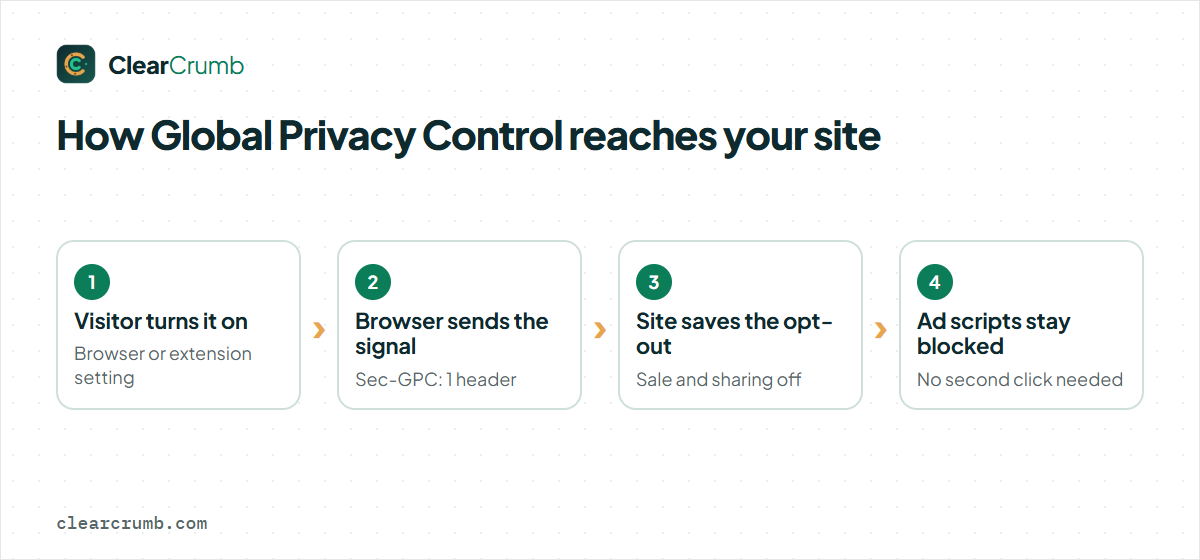
It exists because opt-out rights are tedious to use one site at a time. A visitor who has to click “Do not sell or share my info” on every site they open will give up. With Global Privacy Control the choice is made once, in the browser, and applies everywhere. Several privacy-focused browsers and extensions send it, and some turn it on by default. The specification and a list of supporting tools are on the Global Privacy Control website.
Global Privacy Control is not the same as the old “Do Not Track” header. Do Not Track had no legal weight and websites ignored it. GPC is named in law in several US states.
Which laws point to GPC
There is no single US privacy law. Each state has its own, and the rules around opt-out signals differ in detail and in the date they apply. In general terms, several state laws ask businesses to recognise a “universal opt-out mechanism” or an “opt-out preference signal”, and Global Privacy Control is the signal that regulators and the laws’ own rules point to.
| State | Law | What it says about signals |
|---|---|---|
| California | CCPA / CPRA | Businesses must treat opt-out preference signals such as Global Privacy Control as a valid request to opt out of sale and sharing. The California Attorney General has enforced this. |
| Colorado | Colorado Privacy Act | Requires recognition of universal opt-out mechanisms. |
| Connecticut | CTDPA | Requires recognition of opt-out preference signals. |
| Texas, Montana, Oregon and others | State privacy acts | Include similar rules, with their own start dates. |
The list grows, and effective dates differ from state to state, so check each law that applies to you. The California Attorney General’s CCPA page is a good starting point for the strictest and best-known version.
It also depends on whether the law applies to you at all. Most state laws have thresholds, for example the number of consumers whose data you process or your revenue from selling data. A small local blog may be outside them; an online shop with advertising partners may well be inside.
What “honouring GPC” means in practice
Receiving the signal is the easy part. The work is what the site does with it. For a visitor whose browser sends Global Privacy Control, “honouring” it normally means:
- Treat it as an opt-out of sale and sharing. For this visitor, advertising and cross-site tracking scripts that “sell or share” data must not run.
- Apply it without asking again. The signal is the choice. Showing a banner and requiring a click defeats its purpose.
- Remember it. The opt-out should persist for this browser, so the next visit does not reset the state.
- Tell the visitor. A short note that the signal was recognised is good practice, and some rules expect it.
What it does not usually mean is blocking every cookie. Strictly necessary functions and first-party analytics that do not sell or share data can continue under most of these laws. Which scripts count as “sale” or “sharing” is the part to get advice on, because it depends on how your advertising and analytics partners use the data.
For EU, UK and Swiss visitors the situation is different: those laws ask for opt-in consent before anything optional runs, GPC or not. A Global Privacy Control signal from an EU visitor only reinforces a “no”.
How ClearCrumb handles Global Privacy Control
ClearCrumb treats Global Privacy Control as part of its geo rules. The banner decides what to show based on where the visitor is:
| Visitor from | Rule | What happens with GPC |
|---|---|---|
| EU/EEA, UK, Switzerland | Opt-in | Nothing optional runs before a yes; GPC is not needed. |
| United States | Opt-out | If the browser sends Global Privacy Control, an opt-out of marketing is saved automatically and a short note replaces the banner. |
| Rest of the world | Your choice | Opt-in by default; you can choose opt-out, notice only or no banner. |
The region is decided in the visitor’s browser through a small request that is never cached, so a cached page never shows the wrong banner. Your server reads the country from Cloudflare or your host’s header; without one, the visitor’s time zone is used as a fallback. On Cloudflare the country header is there by default.
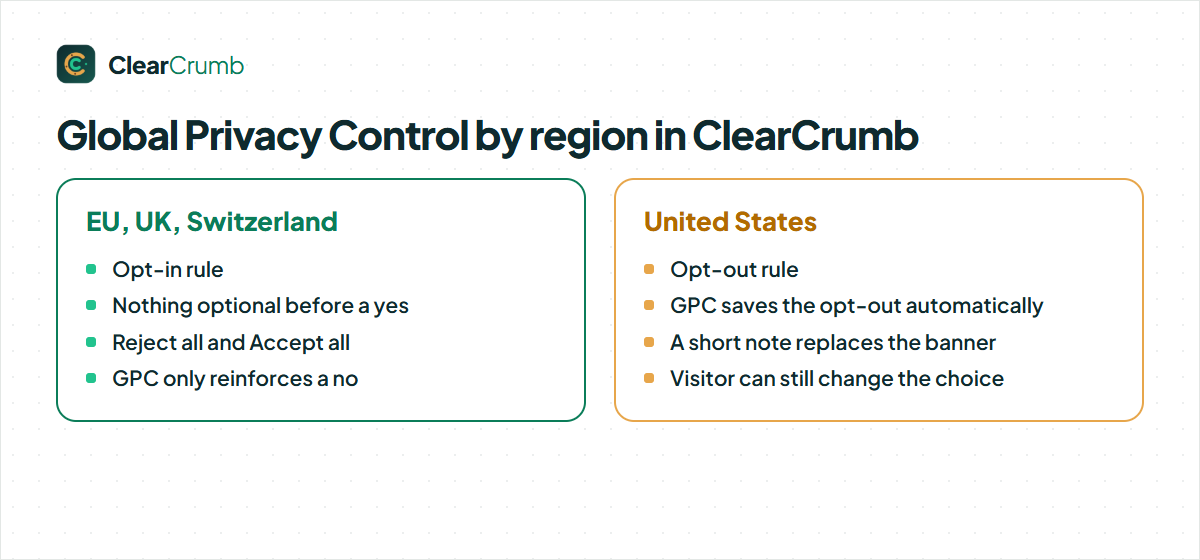
The rules live under ClearCrumb → Banner → Regions. If you prefer the strictest setup, turn geo rules off and show the opt-in banner to everyone.
State-by-state differences
Some states add rules for sensitive data. Where a law treats certain categories as sensitive, such as precise location or health information, it may ask for opt-in consent rather than opt-out. ClearCrumb Pro adds per-state rules for the US laws it covers and a switch for sensitive-data opt-in, based on the visitor’s state when your CDN provides it. On Cloudflare, you turn on “Add visitor location headers” under Managed Transforms so that the state reaches your site.
If you only sell to a few states, you do not need the whole map. Look at where your visitors and customers actually are, check the laws of those states, and set the rules accordingly. The pricing page lists what Pro includes.
What counts as “sale” or “sharing”
The signal is an opt-out of the sale and sharing of personal information, so the question for each script on your site is whether it does that. The laws define the terms broadly. “Sale” is not only money for data; it can be an exchange for other valuable consideration. “Sharing”, in the California rules, means passing personal information to a third party for cross-context behavioural advertising, that is, advertising based on activity across different sites.
In practice, scripts that usually fall on the “sale or sharing” side are advertising pixels, retargeting tags and data broker integrations. Scripts that usually do not are the ones that only serve you: privacy-friendly first-party statistics, a payment provider on checkout, a security service. The edge cases depend on the contract with the provider, which is why your legal advice matters more than any general list.
Common misunderstandings
- “GPC only matters in California.” California was first, but other states name opt-out signals too, and visitors do not stop at state lines.
- “A banner with a button is enough.” For visitors who send Global Privacy Control, the signal itself is the request. Asking them to click again is not honouring it.
- “We do not sell data, so we can ignore it.” “Sharing” for advertising is covered too, and a pixel from an ad network may count even if you never receive money.
- “It works for logged-in users only.” The signal applies to the browser, so it should apply whether or not the visitor has an account. Where you can link it to an account, apply it there too.
What to put in your privacy policy
If you honour Global Privacy Control, say so. A privacy policy for US visitors usually mentions the right to opt out of sale and sharing, how to exercise it (the button and the signal), and what happens when the signal is detected. Keep it short and accurate; the same wording should match what the site really does, which is another reason to test it.
GPC, caching and your CDN
Many WordPress sites sit behind a page cache or a CDN, and that is where Global Privacy Control support quietly breaks. If the server decides on the banner and caches the page, the first visitor’s answer is served to everyone, including visitors whose browsers send the signal. The fix is to make the decision in the visitor’s browser, on every visit, and to keep that request out of the cache. ClearCrumb works this way, which is why full-page caching keeps working.
The signal can also be read on the server, for example to switch off server-side tracking for a request. That is a task for custom code or a plugin that supports it. If you send conversion events from the server to an ad platform, make sure that path respects the opt-out too, because a banner in the browser cannot stop a request that never goes through the browser.
A short checklist for site owners
- Find out which US state laws apply to your business and when they apply.
- List the scripts on your site that sell or share personal data.
- Make sure those scripts do not run for visitors who send GPC, and for visitors who opted out.
- Test with a GPC-enabled browser, and again on a returning visit.
- Mention the opt-out and the signal in your privacy policy.
- Re-test after plugin or tag changes, because new scripts bring new data flows.
How to check your own site
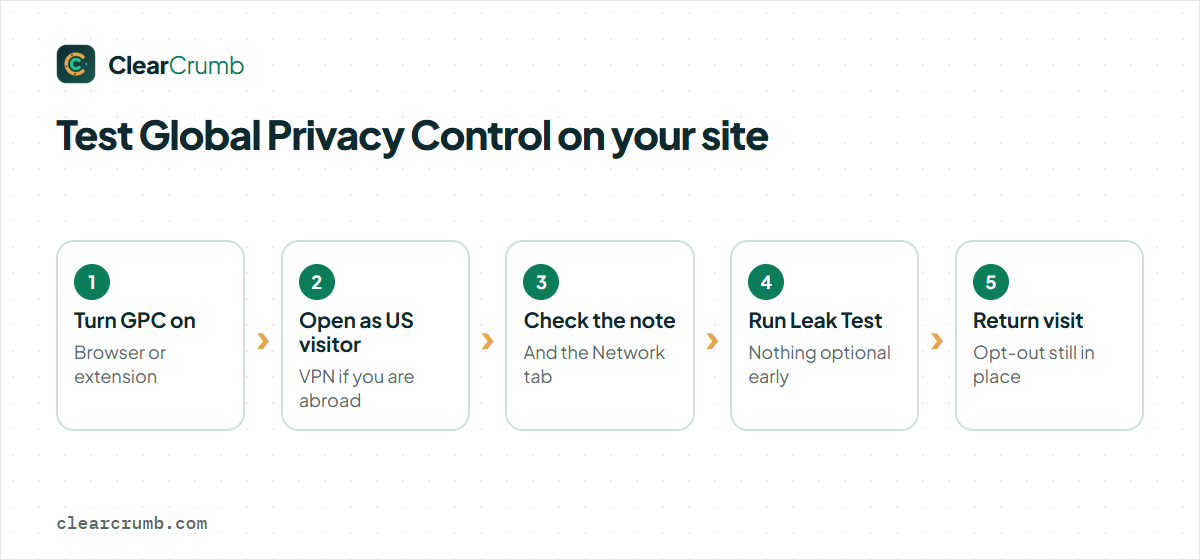
- Turn Global Privacy Control on. Use a browser that sends it by default, or install a GPC-enabled extension. Visit the GPC website to confirm the signal is being sent.
- Open your site as a US visitor. If you are outside the US, a VPN with a US exit is the easiest way to test.
- Look for the note and check the scripts. You should see that the opt-out was recognised, and no advertising pixels should load. The Network tab shows this.
- Run the Leak Test. It confirms that nothing optional fires early. See the leak test guide for how to read it.
Test a returning visit as well, in the same browser. The opt-out should still be in place. Then switch Global Privacy Control off and reload: the visitor should be treated as before, with the normal opt-out button, which proves the signal itself was what changed the behaviour.
Frequently asked questions
Is Global Privacy Control legally required for my site?
It depends on where your visitors are and on whether the state laws apply to your business. Several states require recognising it; others do not yet. A lawyer who knows your situation can tell you which apply.
Does GPC replace my cookie banner?
No. GPC covers one right, the opt-out of sale and sharing, for visitors who send it. Visitors who do not send it still need a way to opt out, and EU, UK and Swiss visitors need an opt-in banner.
What if a visitor sends Global Privacy Control and also accepts cookies in the banner?
Treat the more specific, later choice with care and follow your counsel’s advice. In ClearCrumb, GPC saves the opt-out automatically and the visitor can still change their choice from the cookie settings button.
Does GPC work on WordPress without a plugin?
The signal arrives at your server in a header and in the browser, but WordPress does nothing with it by itself. You need a consent tool that acts on it and keeps scripts from running.
Does the free ClearCrumb plugin honour GPC?
Yes. Global Privacy Control handling and the EU/US region rules are part of the free plugin. Per-state rules are in Pro.
Summary
If you remember one thing, make it this: the signal is a request, not a suggestion, and it should change what your site does without any extra click.
GPC turns an opt-out into a browser setting. Several US state laws say a site should treat it as a valid request, so the practical job is to detect the signal, apply an opt-out of sale and sharing without asking again, and remember it. Check which laws apply to your business, test with a GPC-enabled browser, and run a leak test to confirm that nothing optional loads. With ClearCrumb the signal is handled for US visitors by default; the geo rules guide has the full detail, and the features page shows what else is included.