Home / Features
30 free features
Everything a cookie banner needs, in the free plugin
These are the cookie consent features in the free ClearCrumb plugin. Grouped the way you will use them. Items marked PRO come with the ClearCrumb Pro add-on; everything else is free on WordPress.org.
Banner
A banner people can read and answer in one go, with Reject always equal to Accept.
- Setup wizardFive steps: region, scan, services, design, done.
- 4 banner layoutsBox left, box right, bottom bar and centre modal, with live preview while you edit.
- Accept, Reject and PreferencesFour categories: necessary, preferences, statistics, marketing. Reject has the same size and weight as Accept.
- Cookie settings button and linkFloating button,
Cookie settingsshortcode and a block, so visitors can change their mind. - 6 design presetsClearCrumb, Paper, Minimal, Ocean, Sunset and Lavender, each with light and dark.
- Block editor blocksCookie policy table and Cookie settings link.
- 8 more layouts PROTop bar, floating pill, corner card, split panel, full screen, slide-in drawer, compact bar, inline.
- A/B test banner versions PROTest text, layout or design and see which gets more answers.
- Settings history with one-click rollback PROEvery change saved with who made it and when.
Script blocking
Trackers wait until the visitor agrees. Nothing loads early, nothing breaks.
- Automatic blockingScripts, iframes and stylesheets of known services are held back until consent, including ones added later by JavaScript.
- Service library of 155GA4, Tag Manager, Meta Pixel, Clarity, Hotjar, YouTube, Vimeo, Google Maps, reCAPTCHA, TikTok, LinkedIn, Pinterest and more. Shipped inside the plugin, no remote calls.
- Content placeholdersYouTube, Vimeo and Google Maps show a local preview with "Load" and "Always allow" buttons. No request to Google before consent.
- Cache-plugin safeWorks with full-page caching; excludes itself from WP Rocket, LiteSpeed Cache, Autoptimize and SiteGround Optimizer.
- Form consent checkboxAdds a consent box to Contact Form 7 and WPForms automatically.
- Form consent log PROProof of every ticked form box, searchable by email (stored hashed).
- WooCommerce checkout consent PROMarketing opt-in at checkout with proof on the order.
Google, Microsoft and ad platforms
Consent signals the ad platforms understand, so you keep your measurement legally.
- Google Consent Mode v2Basic and advanced mode, ad data redaction and URL passthrough.
- Microsoft UET and Clarity consentUET consent mode and Clarity consent signal.
- Meta Pixel and TikTok consent APIsPixels can run in revoked mode until the visitor agrees.
- WP Consent APIOther plugins that support the WP Consent API follow the visitor's choice.
- Tag Manager eventA
clearcrumb_consentdataLayer event on every choice. - Server-side consent PROYour server code and supported pixel plugins check consent before sending conversions.
- Lost conversions report PROHow many WooCommerce orders came from visitors who said no to ads.
Geo rules and GPC
One banner that follows the law where your visitor is.
- EU/EEA, UK and Switzerland: opt-inNothing optional runs until the visitor agrees.
- United States: opt-out"Do not sell or share my info" button; the rest of the world is your choice.
- Global Privacy ControlGPC is honoured automatically for US visitors.
- Works with page cacheThe region is decided in the browser through a tiny uncached request, so caches never serve the wrong banner.
- Per-US-state rules PRO21 state laws, with a sensitive-data opt-in switch.
- Banner per language or country PRODifferent text, layout or design by language, country or region.
Records
Proof that you asked, and what people answered.
- Consent logIn your own database, kept as long as you choose, with CSV export. IPs shortened and hashed, consent IDs hashed.
- Dashboard widgetThis week's consent rate on the WordPress dashboard.
- Settings export and importCopy your setup to another site as a JSON file.
- PDF proof of consent PROTurn any consent record into a signed-off PDF for an audit.
- Consent statistics PROAccept rates by day, region and category.
Scanner, Leak Test and Compliance Score
Find what your site really loads, then fix it.
- Cookie scannerScans up to 50 pages in your browser and catches cookies set by JavaScript.
- Leak TestShows what loads before consent and after Accept, with one-click blocking.
- Compliance Score 0–100Checks blocking, missing services, policy, contrast, dark patterns and more, with a fix link for each.
- Import from Complianz, CookieYes, CookiebotBring your old settings across in one click.
- Scheduled scans and leak alerts PROWeekly or monthly checks, also behind login, with an email when something fires early.
- Compliance auto-fix PROFix every failing check with one button.
Languages and legal texts
Speak your visitor's language, including right-to-left.
- 16 banner languagesEnglish, German, French, Dutch, Spanish, Italian, Portuguese, Polish, Swedish, Danish, Finnish, Norwegian, Czech, Romanian, Arabic and Hebrew.
- Cookie policy generatorSelf-updating policy in English, German, French, Dutch, Spanish and Italian.
- WPML, Polylang, TranslatePressYour own banner text is translatable and the policy link follows the language.
- Auto-translate PROYour own banner text in 40+ languages with your DeepL or Google key.
- Privacy policy and imprint generators PROFilled from what your site really uses.
Developers and agencies
Hooks, a JavaScript API and command-line tools.
- JavaScript API
ClearCrumb.get(),has(),open()and theclearcrumb:consentevent. - WP-CLI
wp clearcrumb scanandwp clearcrumb log export. - Filters and actionsChange regions, cookie domain, layouts and blocking per page.
- Multisite and shared consent PROOne answer across subdomains; network-wide banner.
- Agency dashboard PROPush settings to client sites and see their status in one place.
- Staging sites free PROStaging and development sites never use a licence.
Guide
The cookie consent features that matter, explained
Which cookie consent features does a WordPress site need?
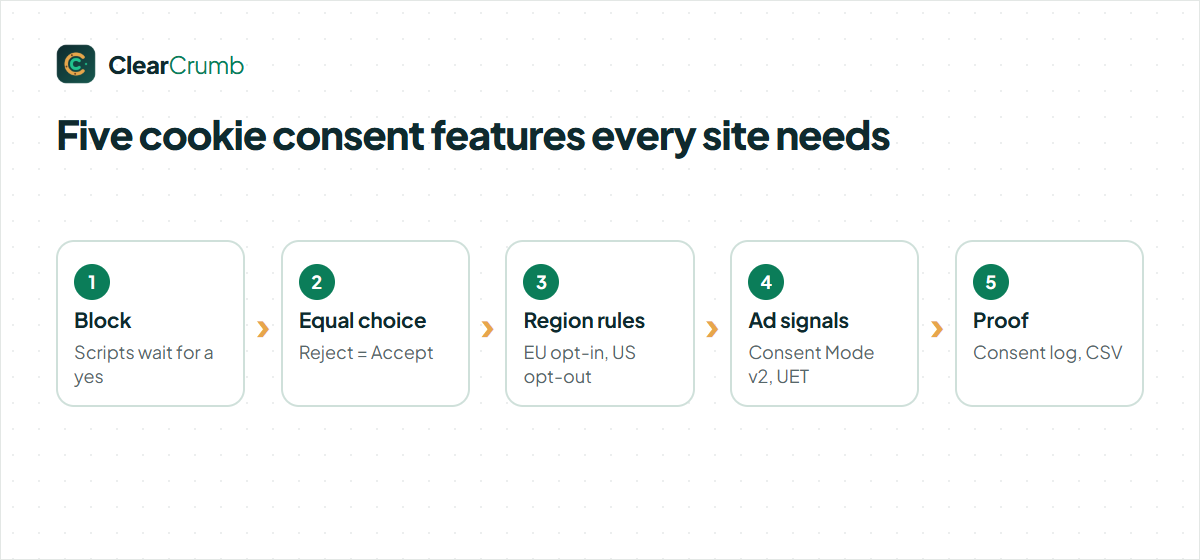
A banner on its own proves nothing. Regulators look at what happens in the browser before a visitor answers, how easy it is to say no, and whether you can show a record later. The cookie consent features below cover those three questions.
- Real script blocking. Google Analytics, the Meta Pixel, YouTube and 155 other services wait until the visitor agrees. Nothing is loaded and then hidden.
- Equal choice. Reject is the same size, colour and weight as Accept. Optional categories are never pre-ticked.
- Region rules. Visitors from the EU, EEA, UK and Switzerland get opt-in. US visitors can get opt-out, and Global Privacy Control is honoured.
- Signals for ad platforms. Google Consent Mode v2 and Microsoft UET Consent Mode get the visitor’s choice, so your ads and analytics stay measurable.
- Proof. A consent log in your own database, kept as long as you choose, with CSV export.
If a plugin is missing one of these cookie consent features, the banner looks fine but the site is still exposed. That is the gap ClearCrumb was built to close, and all five are in the free plugin.
Script blocking: the cookie consent features behind the banner
Most of the work happens on the server, before the page reaches the browser. ClearCrumb rewrites every known tracking script to type="text/plain", moves iframe sources to a data attribute and does the same for tracking stylesheets. The browser cannot run any of them. When the visitor allows a category, the guard script restores exactly the services in that category, in the right order.
Because the page is rewritten the same way for every visitor, it stays cache-safe. WP Rocket, LiteSpeed Cache, W3 Total Cache, Autoptimize, SiteGround Optimizer and FlyingPress all keep working, and ClearCrumb keeps its own files out of their minify and combine steps.
Blocked YouTube, Vimeo and Google Maps embeds show a local placeholder with a thumbnail and a load button. No request goes to Google or Vimeo until the visitor clicks or allows the category. These blocking-related cookie consent features are what separate a real consent tool from a notice bar.
Consent Mode v2, UET and GPC: cookie consent features for ads
Google requires Consent Mode v2 for advertisers who reach users in the EEA. ClearCrumb sets the default state before any Google tag runs and updates it on every choice, in basic or advanced mode. You can also redact ad click identifiers while ad consent is denied.
Microsoft Advertising gets the same treatment through UET Consent Mode, and Microsoft Clarity receives the choice when it is on the page. Meta Pixel and TikTok Pixel can run in their own consent mode instead of waiting. Every choice is also pushed to the dataLayer for Google Tag Manager, and plugins that support the WP Consent API read it directly.
For US privacy laws, Global Privacy Control is treated as an opt-out of sale and sharing. These signal-related cookie consent features keep your measurement honest without asking you to write code. The official background is in Google’s Consent Mode guide.
Consent log, scanner and Leak Test: cookie consent features for proof
Proof is where many free plugins stop. ClearCrumb keeps three kinds of evidence:
- The consent log. Every answer is stored in your WordPress database with the time, a hashed consent ID, the categories, the region and the banner version. IP addresses are shortened and hashed. You choose how long records are kept, from 30 days to forever, and export them as CSV.
- The cookie scanner. It visits your pages, lists the cookies and services it finds and sorts them against a library of 155 services, so your cookie policy stays complete.
- The Leak Test. It loads your pages like a brand-new EU visitor who has not clicked anything and lists every tracker that still fires. The goal is zero.
The Compliance Score then adds it up and tells you what to fix. Together these cookie consent features let you answer the question a regulator or client will ask: what did this visitor agree to, and did the site respect it?
Design, languages and accessibility: cookie consent features visitors see
The free plugin has four layouts (bottom bar, box left, box right and center modal), six styles, a dark version and your own button colour. The editor shows the real banner as you change it.
The banner speaks 16 languages, including Arabic and Hebrew with a mirrored layout, and works with WPML, Polylang and TranslatePress. The cookie policy it generates comes in six languages and updates itself when your services change.
Every release is checked against WCAG 2.2 AA: keyboard use, focus handling in the modal, screen reader labels and contrast for all styles. The banner code stays under 10 KB, so Lighthouse scores do not drop. These visible cookie consent features are the ones your visitors judge you by.
How the cookie consent features work together
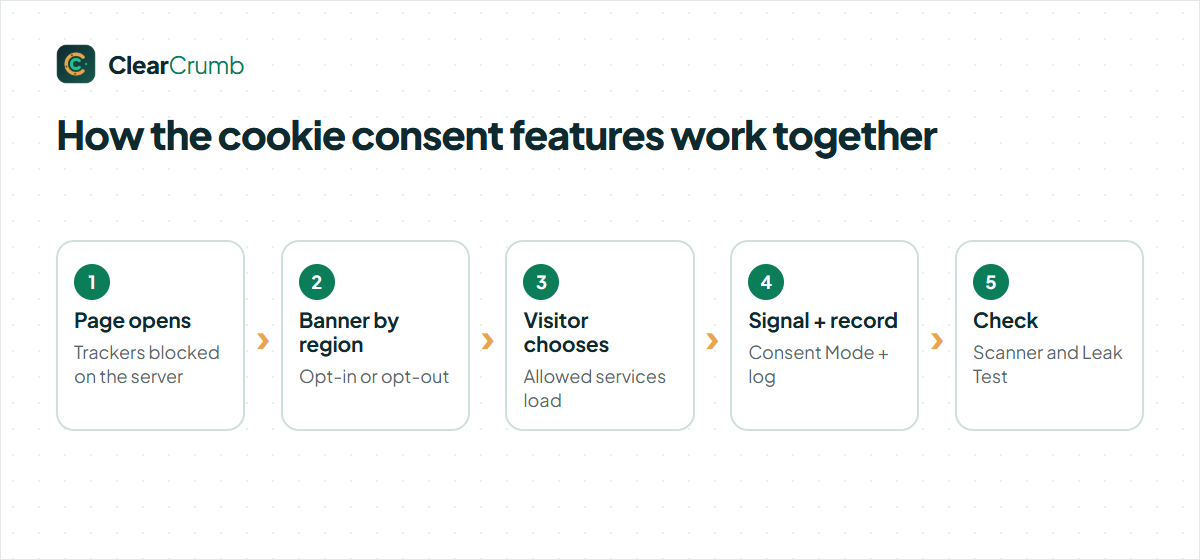
Here is one visit from start to finish:
- The visitor opens a page. ClearCrumb has already blocked every tracking script on the server.
- The guard script works out the region and shows the right banner: opt-in in the EU, opt-out where the law allows it.
- The visitor chooses. Allowed services load at once, the Consent Mode signals update, and the choice is written to the consent log.
- Later, the scanner and the Leak Test check that nothing new slipped in.
You set this up once with the five-step wizard. After that the cookie consent features run on their own, and the dashboard shows the consent rate and anything that needs your attention.
Free and Pro cookie consent features
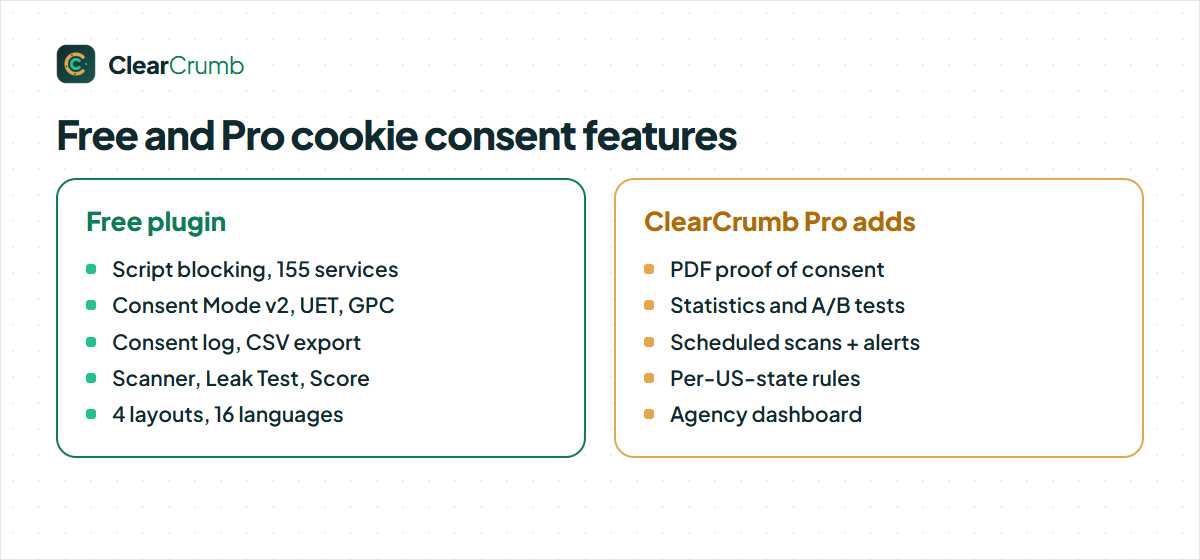
Everything above is free, with no pageview limit, no account and no time limit. ClearCrumb Pro is a separate plugin for busy sites and agencies. It adds PDF proof of consent, consent statistics and A/B tests, scheduled scans with leak alerts, rules per US state, auto-translation into 40+ languages, eight more layouts, WooCommerce checkout consent, server-side consent and an agency dashboard.
The rule is simple: the free plugin never locks or limits one of its own cookie consent features to make you upgrade. Pro adds new ones. See the plans on the pricing page.
Import and export: cookie consent features for switching
Moving from another plugin is often the hardest part, so two cookie consent features make it quick. The importer reads your current Complianz, CookieYes or Cookiebot settings, even after you deactivate that plugin, and copies the banner texts, colours, region behaviour, Consent Mode options and services. Old consent records are not copied; visitors answer once more on the new banner.
Settings export works the other way round. One JSON file holds the banner, regions, signals and services, so you can copy a tested setup to a staging site, a second site or a client. The cookie policy address and the consent log stay on each site, as they should.
Hooks and WP-CLI: cookie consent features for developers
Developers get a small, documented surface. The JavaScript API answers ClearCrumb.get() and ClearCrumb.has('statistics'), opens the preferences with ClearCrumb.open() and fires a clearcrumb:consent event on every choice. PHP filters let you add services, change the region rules or skip blocking on special pages.
On the command line, wp clearcrumb scan lists what your pages load and wp clearcrumb log export writes the consent log as CSV or JSON for a backup or an audit. These cookie consent features keep custom sites and agency workflows scriptable. See Hooks & WP-CLI.
Retention and export: cookie consent features for records
How long should you keep consent records? Long enough to answer a question about a visitor’s choice, and no longer than you need. Data protection authorities rarely give one number, so ClearCrumb lets you decide: 30, 90 or 180 days, one year by default, three or five years, or forever. Older records are cleaned up every night, so the database does not grow without limit.
The Consent log screen filters by period, region and choice, and finds one visitor by the consent ID they see in their preferences. Export CSV gives you the whole set for an audit. Together these cookie consent features make the log useful, not just present.
Cookie consent features: questions
Are all these cookie consent features really free?
Yes. Blocking, Consent Mode v2, UET, GPC, region rules, the consent log, the scanner, the Leak Test and 16 languages are in the free plugin on WordPress.org.
Do the cookie consent features slow my site down?
No. The banner is under 10 KB and the blocking happens on the server, so there is no extra round trip.
Which cookie consent features help with GDPR?
Prior blocking, equal choice, easy withdrawal and the consent log. The EDPB consent guidelines explain why each one matters. ClearCrumb helps you meet the rules; it is not legal advice.
Can I move my settings from another plugin?
Yes. ClearCrumb imports from Complianz, CookieYes and Cookiebot in one click. See Import from other plugins.
All of the free column is yours today.
No account, no pageview counting, no trial.