WooCommerce cookie consent comes down to one rule of thumb: keep the cart, session and payment scripts running, and hold every optional tracker, such as analytics, ad pixels and session recorders, until the visitor agrees. Blocking the first group breaks checkout; letting the second group run early is the usual consent mistake. This guide is for shop owners in the US, UK and EU, and shows what to leave alone, what to block, how to set it up in ClearCrumb and how to test the result at checkout.
In this article
WooCommerce cookie consent in one table
Most of WooCommerce cookie consent is sorting what a shop loads into two piles. The first pile exists so the visitor can buy; the second exists so you can measure or advertise.
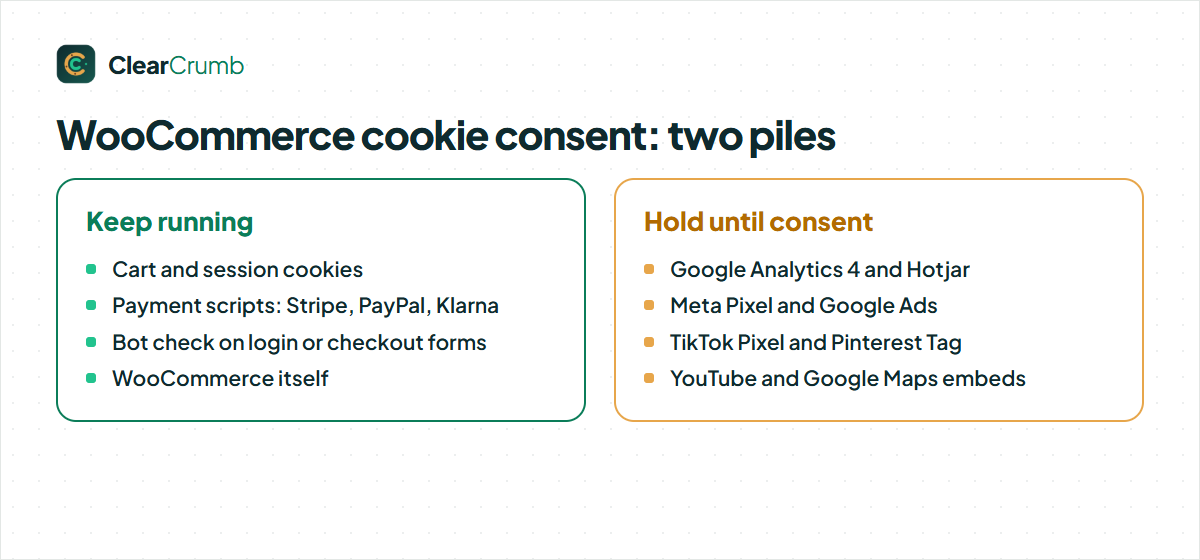
| Pile | Examples | What to do |
|---|---|---|
| Needed to shop | WooCommerce cart and session cookies, the payment gateway script (Stripe, PayPal, Klarna), a bot check on the login or checkout form | Leave running. Blocking them can break the basket or the payment. |
| Measurement | Google Analytics 4, Hotjar or another recorder | Hold until the visitor agrees to statistics. |
| Advertising | Meta Pixel, Google Ads tag, TikTok Pixel, Pinterest Tag | Hold until the visitor agrees to marketing. |
| Embeds | YouTube videos on product pages, Google Maps on a store page | Show a placeholder until the visitor loads them. |
The rest of this article explains the reasoning behind WooCommerce cookie consent, so you can handle the plugins that are not on that list.
WooCommerce cookie consent: the cookies WooCommerce itself sets
WooCommerce’s own cookie documentation lists the cookies the storefront can set. They are few, and each has one job.
| Cookie | Lifetime | Purpose |
|---|---|---|
woocommerce_cart_hash |
Session | Notices when the contents of the cart change |
woocommerce_items_in_cart |
Session | Notices when the contents of the cart change |
wp_woocommerce_session_ + a code |
2 days | A unique code that finds this customer’s cart data in your database |
woocommerce_recently_viewed |
Session | Powers the Recently Viewed Products widget |
store_notice + an id |
Session | Lets a customer dismiss the store notice |
The first three keep a basket working. The UK regulator’s guidance on storage and access technologies describes an exception for storage that is essential to provide a service the user asked for, and gives remembering the goods a user adds to a basket at checkout as a likely example. That is why cart and session cookies do not need a consent choice. The last two are conveniences, and you can leave them to the same rule or switch the feature off.
The ICO’s wording of the exception is on its page about the exceptions. It also warns that if you use the same storage for anything beyond the strictly necessary purpose, the exception no longer applies. Keep that sentence in mind for the section on order attribution further down.
WooCommerce cookie consent for payment scripts: leave them running
A payment provider’s script is the part of WooCommerce cookie consent that most worries owners, because it is a third party and it sets cookies. In practice it should not sit behind your banner. Stripe, for example, says that Stripe.js and its mobile SDKs collect device and activity signals to prevent fraudulent payments, that it encourages including Stripe.js on every page of the shopping experience and not just checkout, and that the data is used only for fraud detection and security. Its page on advanced fraud detection also explains how to switch the extra signals off if you choose to, at the price of more fraud risk.
The same logic applies to PayPal, Klarna and a reCAPTCHA on a login form: they protect the transaction the visitor asked for. ClearCrumb’s service library files Stripe, PayPal, Klarna, Google reCAPTCHA and WooCommerce itself under Necessary, which means they are never held back, and a service in that category cannot be moved by hand. That is a deliberate guard against breaking your checkout.
Two caveats are worth stating plainly. First, a payment provider may add features beyond payment, such as marketing or analytics options in its own dashboard. Those are not covered by the same reasoning, so check what you have enabled. Second, “necessary” is a judgement about the visitor’s request, not a label a plugin can grant you for free. If a vendor’s script does something other than payment or fraud prevention on your site, treat that part like any other tracker.
What WooCommerce cookie consent should hold back
In WooCommerce cookie consent, everything that exists to measure or advertise should wait. A few of these are easy to forget because they were added by a plugin, not by you.
| Service | Category in ClearCrumb | Typical way it gets onto a shop |
|---|---|---|
| Google Analytics 4 | Statistics | A Google tag, a theme option or a WooCommerce integration |
| Hotjar | Statistics | A tracking snippet in the theme or a tag manager |
| Meta Pixel | Marketing | A Facebook for WooCommerce plugin or a pasted snippet |
| Google Ads | Marketing | A conversion tag from a Google Ads plugin |
| TikTok Pixel and Pinterest Tag | Marketing | Channel plugins for WooCommerce |
A session recorder deserves special mention on a shop. A recording of a checkout page can include names, addresses and other personal details that are typed into forms, so keep it behind consent and review its masking settings before you enable it at all.
One limit is worth knowing. A banner that blocks scripts in the browser cannot see what your server sends on its own. If a plugin reports orders to an advertising platform from the server, through a conversions API for example, no browser-side blocking will stop it. Such a plugin needs its own switch tied to consent; look for a consent option in its settings.
Setting up WooCommerce cookie consent in ClearCrumb
WooCommerce cookie consent setup takes about ten minutes on a typical shop and uses two screens.
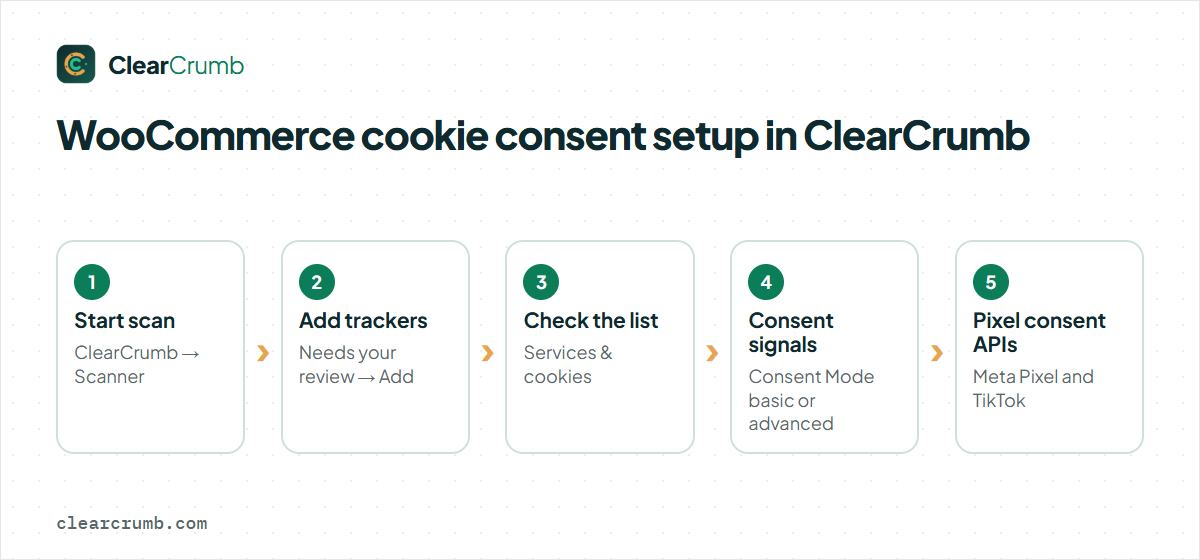
- Run the scanner. Go to ClearCrumb → Scanner and click Start scan. It opens your home page, shop pages if you have WooCommerce, and your latest posts and pages in a hidden frame in your browser. Keep the tab open until it finishes.
- Review the results. Under Needs your review, a recognised service has a New service chip and an Add button. Click it for every tracker you want held back.
- Check the list. Go to ClearCrumb → Services & cookies and confirm that your analytics and advertising services are there and set to wait for consent. The library holds 155 services, so most plugins you use are recognised by name.
- Turn on Consent Mode if you use Google tags. Open Consent signals on the same screen. Consent Mode v2 is on in basic mode by default, which blocks Google tags completely until a yes. Advanced mode loads them with every signal denied. The Consent Mode documentation explains both.
- Turn on Pixel consent APIs for Meta and TikTok in the same card if you use those pixels. The Meta Pixel snippet then runs with consent revoked, and the TikTok snippet is held until the visitor agrees to marketing.
The general mechanism, including video and map placeholders, is described on the blocking documentation. After any change, clear your page cache so cached pages carry the new blocking.
Order attribution: a feature to decide on
Recent WooCommerce versions include a feature called Order Attribution. WooCommerce’s documentation describes it as showing which channels, sources or campaigns led to an order, using cookies whose names begin with sbjs_. Its data is stored when an order is placed, and the documentation states that the feature is compatible with the WP Consent API.
ClearCrumb’s library lists those cookies under WooCommerce, in the Necessary category, so they are not blocked. Whether attribution is strictly necessary for a shopper’s basket to work is a fair question, though: its purpose is reporting on marketing channels, not delivering the goods. If you prefer to be cautious, you can switch the feature off in WooCommerce → Settings → Advanced → Features by turning off Order Attribution. You lose channel data on new orders and nothing else.
Test your WooCommerce cookie consent at checkout, not just the home page
A banner that works on the home page can still fail your WooCommerce cookie consent on the pages that matter most. Test as a new visitor, in a private window.
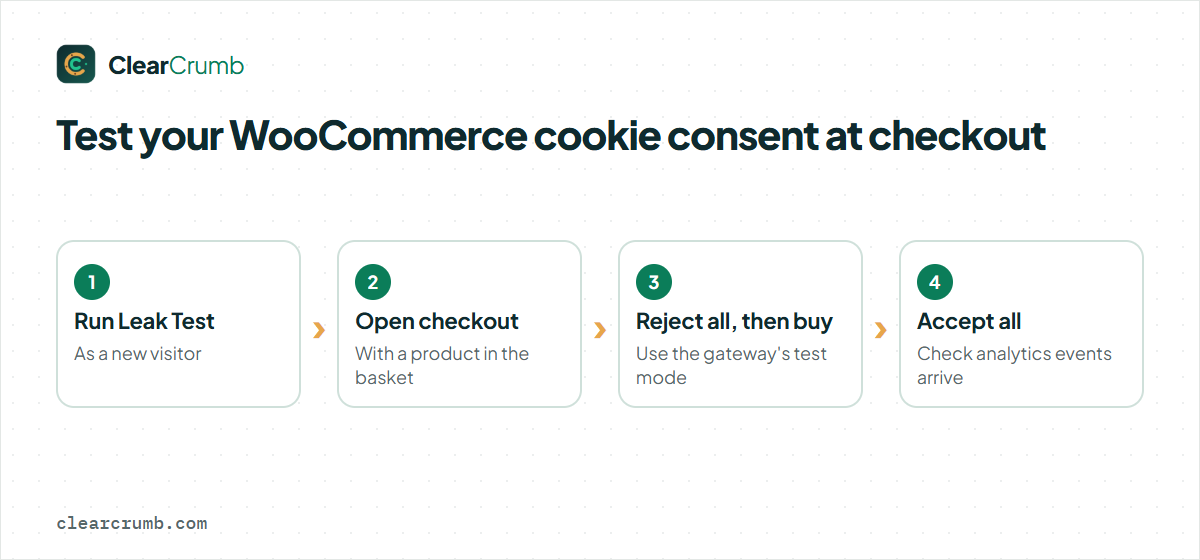
- Run the Leak Test. Click Run Leak Test on the ClearCrumb dashboard. Read the leaks list and use Block for anything that should wait. The cookie banner leak test guide explains each line.
- Add a product, then open the checkout by hand. WooCommerce shows an empty-cart notice or redirects when the basket is empty, so an automated crawl may not see the real checkout. Open the Network tab and look for requests to advertising or analytics hosts before you accept.
- Reject, then buy. Press Reject all and complete a test order with your payment gateway’s test mode. If the order works with every optional category refused, you have not blocked something necessary.
- Accept, then check the tags fire. After Accept all, confirm that your analytics and conversion events arrive.
Repeat this WooCommerce cookie consent test after you install a new marketing plugin, change your theme or update a payment gateway. Those are the moments a new tracker usually appears.
US, UK and EU visitors on the same shop
Good WooCommerce cookie consent has to cope with visitors from different places, because a shop that sells across borders serves visitors under different rules. ClearCrumb decides the banner by region in the browser: EU, UK and Swiss visitors get an opt-in banner with Preferences, Reject all and Accept all, and US visitors get an opt-out banner where Global Privacy Control is honoured automatically. You can read the background in the Global Privacy Control guide. The rules are set under ClearCrumb → Banner → Regions, and turning geo rules off shows the opt-in banner to everyone, which is the strictest setup and the simplest to explain.
Common mistakes on a shop
| Mistake | What happens | Fix |
|---|---|---|
| Blocking cart or session cookies | The basket empties or checkout stops working. | Keep WooCommerce in the Necessary category. |
| Letting the Meta Pixel run before consent | An advertising tracker fires on the first page view. | Add it as a service and turn on Pixel consent APIs. |
| Testing only the home page | A leak on the product or checkout page goes unnoticed. | Test a product page and the checkout by hand. |
| Forgetting server-side events | Orders are still reported to an ad platform for refusers. | Use that plugin’s own consent option. |
| Forgetting the page cache | Visitors get pages built with the old blocking. | Clear the cache after changing services. |
Frequently asked questions
Does WooCommerce cookie consent apply to cart cookies?
Generally no. Cookies that remember what is in the basket are needed to provide the service the visitor asked for, which is the kind of use the strictly necessary exception describes. Keep them out of the banner’s blocking.
Do I need WooCommerce cookie consent if I only sell in the US?
Several US state laws ask for notice and an opt-out of sale and sharing, and some require honouring Global Privacy Control, so a US-only shop usually still needs something. What it needs depends on the states you sell into and your size.
Will WooCommerce cookie consent hurt my ad results if I block the Meta Pixel?
You will not measure visitors who refuse, so reported conversions can drop. That is the expected effect of asking first; consent signals let some platforms model part of the gap.
Can my WooCommerce cookie consent setup keep Google Analytics running without consent?
That depends on your region and how the tool is configured. In the UK and EU a standard setup needs consent. Use Consent Mode and the region rules instead of leaving it on for everyone.
Does the Leak Test check WooCommerce cookie consent on the checkout page?
It loads your pages as a new visitor, and WooCommerce may redirect an empty basket away from checkout. Test the checkout by hand with a product in the basket as well.
Is a newsletter tick box the same as cookie consent?
No. A checkbox for marketing emails is permission for a message; cookie consent is permission for storage and tracking in the browser. They are separate choices and should be collected separately.
Summary
A shop’s WooCommerce cookie consent works when the basket and the payment keep running and everything that measures or advertises waits for a yes. Scan the site, add the trackers you find, set Consent Mode, decide on Order Attribution, and then test a real checkout as a new visitor. The feature list shows what the free plugin includes for this.