ClearCrumb is a free CookieYes alternative for WordPress with no pageview limit, a consent log stored in your own database and no cloud account to connect. Pick it if your site has more than a few thousand visits a month or you run several sites. Stay with CookieYes if you manage non-WordPress sites from one dashboard or need IAB TCF today.
In this article
CookieYes alternative: the short answer
CookieYes is a popular consent service with a WordPress plugin, and it is easy to set up. This page is a plain CookieYes alternative comparison from the makers of ClearCrumb, so read it with that in mind. The facts about CookieYes come from its public pricing page and its WordPress.org listing, checked in October 2026.
The main difference is architecture. CookieYes is a cloud service: you connect the plugin to a CookieYes account, the banner configuration and the consent log live there, and your plan is measured in pageviews. ClearCrumb is a plugin that does everything inside WordPress: the settings, the service library and the consent log stay in your own database, and nothing is counted.
If you are weighing a CookieYes alternative, the table below answers the questions people ask most often.
| Question | ClearCrumb (free) | CookieYes |
|---|---|---|
| Free pageview limit | None | 5,000 a month on the free plan |
| Account needed | No | Yes, a CookieYes account connected to the plugin |
| Where the consent log lives | Your WordPress database | CookieYes cloud |
| Script blocking before consent | Yes, 155 services | Yes |
| Google Consent Mode v2 | Yes, basic and advanced | Yes |
| Leak Test and Compliance Score | Yes | No |
| IAB TCF | Not yet | Paid plans |
| Pricing model | Free; Pro flat per site count | Per domain, by pageviews |
What CookieYes does well, and when a CookieYes alternative is not needed
An honest CookieYes alternative page has to say what you would give up. CookieYes is quick to get running: connect an account, pick a template and a banner is live in minutes. Its dashboard shows consent statistics, and it works on non-WordPress sites too, so an agency or business that runs a mix of platforms can keep one login for all of them.
It also offers a hosted cookie scanner, a policy generator, and paid plans that add IAB TCF, A/B testing of banner designs and multi-language support. If you already run several non-WordPress sites and want one place to manage them all, that is a real benefit that a WordPress plugin cannot match.
The trade-off is the model. A cloud dashboard means your configuration and records live with a third party, plans scale with traffic, and the banner depends on a remote service being reachable. For many WordPress-only sites that is more machinery than needed.
The free versions: ClearCrumb as a CookieYes alternative
The free plan is where CookieYes alternative searches usually begin, because that is what you can test without paying.
That is what a CookieYes alternative should mean: the free plugin is the real product, not a time-limited trial.
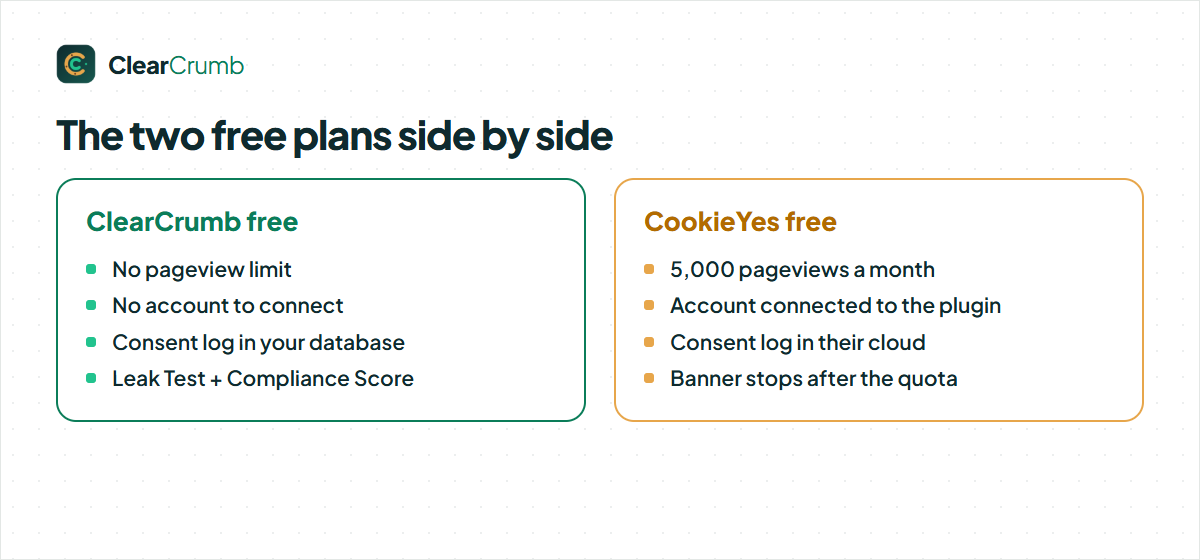
ClearCrumb free has the banner in four layouts, blocking for 155 known services, Consent Mode v2, Microsoft UET consent, EU opt-in and US opt-out rules, Global Privacy Control, a consent log in your database, kept as long as you choose, the scanner (up to 50 pages), the Leak Test, the Compliance Score and 16 languages. It has no account and no traffic limit.
CookieYes free gives you a banner with automatic cookie scanning and blocking, but the plan is capped at 5,000 pageviews a month and limits scan depth. Reviews on WordPress.org describe the banner stopping once the monthly quota is exceeded until the next period or an upgrade. If your site grows past the quota, that is the point at which you must pay or the banner stops doing its job.
Where your consent data lives
With a cloud service, the consent record is written to the vendor’s servers. With ClearCrumb, it is written to a table in your own WordPress database. IP addresses are shortened and hashed before saving, consent IDs are hashed, and the log is searchable and exportable from the dashboard.
This matters in three situations. If you must keep records inside a specific country or on your own server, a local log is the simpler answer. If a customer asks for a data processing agreement with every processor you use, one fewer processor means one fewer document. And if the vendor changes its pricing or shuts a plan down, your history stays with you instead of being locked behind a login.
The reverse is also true. A cloud log is available even if your own server is down, and a cloud vendor handles backups for you. Decide which risk you prefer to manage.
CookieYes alternative: script blocking and Google Consent Mode v2
Both products hold back scripts until the visitor agrees and both send the four Consent Mode v2 signals. For ClearCrumb the details are in the Consent Mode guide. The practical gap is not in the feature list but in verification: ClearCrumb ships a Leak Test that loads up to 15 of your pages twice, as a new EU visitor and again after “Accept all”, and shows what loaded before consent.
A CookieYes alternative that cannot show you its own blocking leaves you guessing, which is why ClearCrumb includes the Leak Test in the free plugin.
Whichever plugin you use, test the live site. A banner that appears but does not block is the most common consent mistake, and the cookie banner leak test guide shows a manual way to check in ten minutes.
Speed and caching
A cloud banner loads a script from the vendor’s domain on every page. ClearCrumb’s banner and blocker ship with the plugin, are under 10 KB gzipped, use no jQuery and are drawn in the browser, so full-page caching keeps working. Our own site scores 99 to 100 for performance on desktop in Lighthouse with the banner running.
We have not benchmarked CookieYes on your site. The fair test is to install both on a staging copy and run Lighthouse on the same pages. If you use a cache plugin, the cache plugin guide lists what to exclude.
CookieYes alternative: three typical sites and what suits them
Feature tables hide the way a site actually behaves, so here are three common cases and how the CookieYes alternative question usually resolves.
A growing blog. Traffic is climbing and has crossed or will soon cross 5,000 pageviews a month. This is the case the free CookieYes plan was not built for: you either upgrade for a recurring fee or risk the banner stopping. With ClearCrumb the free plugin keeps working at any traffic level, and nothing needs to be reconfigured as the audience grows.
A WooCommerce shop. Several marketing tags, an email tool and a payment provider. Both products can block the optional tags and pass Consent Mode signals. The questions that decide it are where you want the records and how many sites you manage. The WooCommerce cookie consent guide explains what should keep running at checkout.
An agency with a mixed portfolio. Some client sites are WordPress, some are Shopify or Webflow. CookieYes can cover all of them from one account, which ClearCrumb cannot. Many agencies split the portfolio: ClearCrumb for WordPress builds where it is free, and a cloud service for the others.
The banner your visitors see with a CookieYes alternative
ClearCrumb’s banner comes in four layouts (bar, box, centred modal and corner card) with a live preview in the dashboard and a colour picker that checks contrast. Accept and Reject carry equal weight by default, and the banner texts come in 16 languages so a multilingual site does not need a separate plugin.
CookieYes offers a template gallery and a customisation screen in its cloud dashboard, which makes it quick to try different looks. Some customisation options and the removal of vendor branding sit on higher paid plans, so check which ones you need before you compare prices.
Whatever you choose, test the banner with the keyboard only. ClearCrumb is built to WCAG 2.2 AA, with focus management and 200 percent zoom support, but your theme and any chat widgets can still get in the way, and only a real test shows it.
What ClearCrumb Pro adds, and who needs it
Most people who search for a CookieYes alternative want to know whether the free plugin is enough. For a single site it usually is. ClearCrumb Pro, which is not on sale yet, is an optional add-on for people who have specific needs the free plugin does not cover:
- Long-term consent records kept for as long as you choose, with signed PDF proof for audits.
- Scheduled scans and leak alerts that email you when a new plugin or tag starts loading before consent.
- Generated documents: a privacy policy and an imprint, written as starting points for you to review.
- Agency tools: one dashboard for every client site, white-label banners and a Compliance Score per site.
- Priority support from the people who build the plugin.
If none of those apply, the free plugin is the whole product. We would rather you stay free and happy than buy something you do not need.
Pricing: what a CookieYes alternative saves you
CookieYes bills per domain, with price rising by pageview tier, and the yearly list prices for several sites add up quickly: at the published rates five sites come to roughly $500 or more a year. ClearCrumb Pro, which is not on sale yet, has launch prices of $39, $89, $179 and $349 a year for 1, 5, 25 and 100 sites, with 30 percent off the first year for waitlist members. Nothing is metered by pageviews and staging sites never count.
| Sites | ClearCrumb Pro per year | CookieYes per year |
|---|---|---|
| 1 site | $39 | Per-domain plan, by pageviews |
| 5 sites | $89 | About 5 × the per-domain price |
| 25 sites | $179 | About 25 × the per-domain price |
Choosing a CookieYes alternative on price alone is a mistake, though. Weigh the features you will actually use, and let the free plugin prove itself on your own site first.
Check the CookieYes pricing page before you decide; plans change. The free ClearCrumb plugin already covers what most sites need, so the table matters only if you want long-term records, scheduled leak alerts or the agency dashboard.
Who should pick a CookieYes alternative, and who should stay
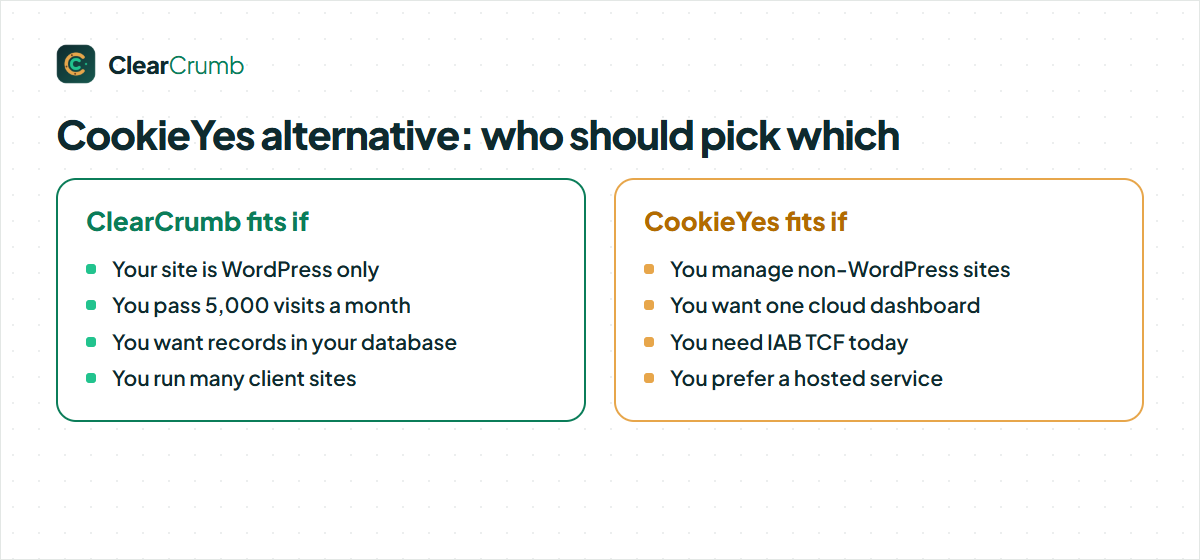
| If this is you | Pick | Why |
|---|---|---|
| You manage sites on several platforms from one dashboard | CookieYes | It works outside WordPress; ClearCrumb is WordPress only. |
| You sell ads to EU visitors through Google | CookieYes (or another TCF tool) | You need IAB TCF; ClearCrumb does not support it yet. |
| Your site has more than 5,000 visits a month | ClearCrumb | No cap on the free version. |
| You want consent records in your own database | ClearCrumb | Nothing leaves your server. |
| You run many WordPress client sites | ClearCrumb | Flat price per site count; staging is free. |
A CookieYes alternative is a good fit when most of the left column describes you. If the right column does, staying where you are is a perfectly sensible choice.
How to switch from CookieYes to ClearCrumb
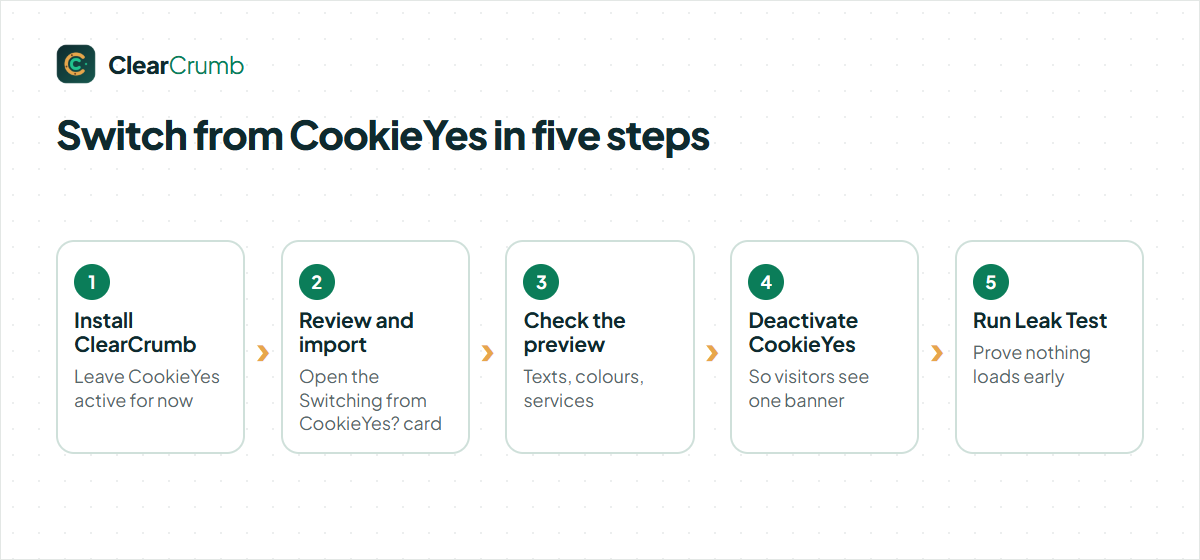
Switching takes about fifteen minutes and you can run both plugins side by side while you check the result.
- Install and activate ClearCrumb and leave CookieYes active for now.
- On the ClearCrumb dashboard, open the Switching from CookieYes? card and click Review and import.
- Check the preview of banner type, position, texts, colours, services and Consent Mode settings, then click Import.
- Deactivate CookieYes so only one banner shows, and clear your page cache.
- Run the Leak Test and confirm nothing optional loads before consent.
That is the whole move to a CookieYes alternative: install, import, check, switch the old banner off and test.
Consent records stay in the CookieYes cloud, so export them first if you need them for audits. Visitors who answered on the old banner are asked once more. The import guide lists exactly what is carried across.
Mistakes to avoid when you move to a CookieYes alternative
Most problems after a switch come from a short list of causes.
- Two banners at once. Leaving CookieYes active next to the new plugin shows two banners and sets two sets of consent cookies. Deactivate the old plugin once the import looks right.
- Cloud script left in the header. If CookieYes was also added through a tag manager or a header snippet, deactivating the plugin does not remove it. Search for the script by name.
- Cached pages. Clear the page cache and the CDN, then test in a private window so you see what a new visitor sees.
- No verification. A visible banner is not proof of blocking. Run the Leak Test or follow the leak test guide.
- Lost records. Consent records live in the CookieYes cloud, so export them before you cancel the account if you need them.
Avoid these five and your move to a CookieYes alternative should be uneventful.
The same checklist applies whichever direction you move; it just avoids a bad week after the change.
Questions to ask before you choose a CookieYes alternative
A comparison page can only go so far. Five questions will settle the decision for your own site faster than any feature table:
- Do I need IAB TCF? If you sell ads to EU visitors through Google, yes, and CookieYes or another certified tool is the answer today.
- How many sites do I manage? One site rarely justifies a paid plan; twenty sites almost always make the price difference matter.
- Where must the consent records live? If the answer is “on my own server”, pick a plugin that stores them locally.
- Who maintains the setup? If your team prefers a managed cloud dashboard, weigh that against local control honestly.
- Can I test before I pay? Install the free plugin on a staging copy and run the Leak Test. Ten minutes of testing beats an hour of reading.
If you answer those five and still cannot decide, run both plugins on a staging site and compare. That is the only comparison that counts.
Frequently asked questions
How long does it take to move to a CookieYes alternative?
About fifteen minutes for a typical site: install, import or scan, check the preview, switch the old banner off and run the Leak Test.
Does a CookieYes alternative make my site GDPR compliant?
A consent plugin helps you meet the consent requirements, but compliance depends on your whole setup: your policies, your processors and what you actually load. Run the Leak Test and ask a lawyer about your own situation.
Is ClearCrumb a good CookieYes alternative?
Yes, if your site is WordPress, has more than a few thousand visits a month or you want the consent log in your own database. If you need one dashboard across non-WordPress platforms or IAB TCF, stay with CookieYes for now.
What happens when CookieYes reaches the pageview limit?
Reviews report that the free banner stops showing until the next month or an upgrade. ClearCrumb has no limit, so that cannot happen.
Can I import my CookieYes settings?
Yes. ClearCrumb imports the banner type, position, texts, colours, services and Consent Mode settings that CookieYes stored in WordPress. You review the list before anything is saved.
Does ClearCrumb need a cloud account?
No. There is no account and nothing is sent to us. The service library, the scanner and the consent log all run inside your WordPress site.
Is ClearCrumb really free?
Yes. The plugin on WordPress.org has all 30 core features with no pageview limits. ClearCrumb Pro is an optional add-on for long-term records and agency tools, and it is not on sale yet.
Will visitors have to give consent again after I switch?
Yes, once. Consent is stored per banner, so visitors see the new banner on their next visit and answer again.
Summary
The right CookieYes alternative question is “which model fits my site”. ClearCrumb fits WordPress sites that want no traffic limit, local records and a cheaper price for many sites. CookieYes fits teams that want one cloud dashboard across platforms or need TCF. Facts about CookieYes were checked in October 2026 on its WordPress.org page and pricing page; see all plugin comparisons for the others.