To switch from Complianz to ClearCrumb, install ClearCrumb next to Complianz, import the old banner settings from the dashboard, deactivate Complianz, then run the Leak Test. It takes about fifteen minutes, your banner text, button colour and services come across, and your old consent records stay behind on purpose. This guide is for WordPress site owners who already run Complianz and want the exact order of steps, what moves, what does not, and how to prove the new banner works.
In this article
Why people switch from Complianz, and when not to
Complianz is a capable and widely used plugin, and there is nothing wrong with staying on it. People usually move for practical reasons: they want records of consent, a scanner and a leak check in the free plugin, a lighter banner, or a lower price once they run several sites. If that is you, a switch is a small job. If you need IAB TCF today, stay where you are, because ClearCrumb does not support it yet.
Before you switch from Complianz, be honest about what you want from the new plugin. The table below is a quick way to decide.
| Your situation | Better choice |
|---|---|
| You sell ads to EU visitors and need IAB TCF | Stay on Complianz for now. ClearCrumb does not support TCF yet. |
| You rely on Complianz’s legal document wizard for many countries | Stay, or generate those documents elsewhere first. ClearCrumb creates a cookie policy page, not a full document suite. |
| You want a free consent log, Leak Test and Compliance Score | Switch. These are in the free ClearCrumb plugin. |
| You manage several small sites on a budget | Switch, then compare the plans on the ClearCrumb vs Complianz page. |
What ClearCrumb imports from Complianz
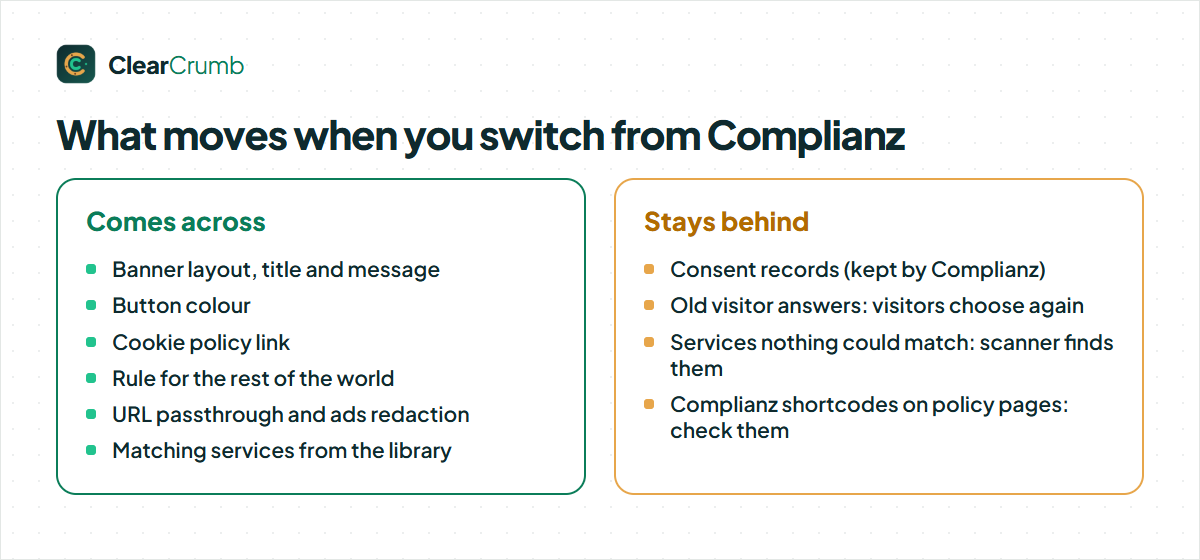
When you switch from Complianz, ClearCrumb reads what Complianz left in your WordPress database: its banner settings, its list of services and cookies, and its Consent Mode options. It does this even after you have deactivated Complianz, so the order of steps is forgiving. You see a preview before anything changes, and the import only adds to your ClearCrumb settings.
| From Complianz | In ClearCrumb |
|---|---|
| Banner position | Banner layout (a centre popup becomes the Center modal, a bottom bar stays a bar, the corner positions become the corner boxes) |
| Banner header and message | Banner title and Banner message, as plain text |
| Accept button colour | Button colour |
| Cookie statement page | Cookie policy link |
| Behaviour for other regions | Rule for the rest of the world |
| Google tag settings | URL passthrough and Ads data redaction |
| Services and cookies it detected | Matching services from ClearCrumb’s library of 155, added to your list |
Two things do not move when you switch from Complianz. Consent records stay with Complianz, because they prove what visitors agreed to there; visitors answer once more on the new banner, which is a clean start for a new log. And anything ClearCrumb cannot match to a service is simply left out of the list, so the scanner picks it up in step four below. The full list per source plugin is on the import documentation.
Before you switch from Complianz: a short checklist
Ten minutes of preparation before you switch from Complianz prevents most problems. None of this is difficult, but each item is easy to forget.
- Take a backup. A full backup of files and database means a bad afternoon is one restore away from being a good one.
- Export your consent records from Complianz if you need them. If you must prove what a visitor agreed to last year, that proof lives in Complianz’s records. Check Complianz’s own documentation for how your version exports them, and keep the export somewhere safe before you ever delete the plugin.
- Note your Google setup. Write down whether you use Google Tag Manager, Google Analytics 4 or Google Ads, and whether Consent Mode was on, so you can compare after the switch.
- Find pages that use Complianz shortcodes. A privacy or cookie policy page that Complianz generated may rely on the plugin to display. Open those pages after you deactivate it, and replace anything that shows raw text.
- Do it at a quiet time. The switch takes minutes, but a page cache and a CDN need clearing at the end.
How to switch from Complianz in five steps
When you switch from Complianz, keep it active until step three. That is deliberate: it lets ClearCrumb read the settings from a working installation and lets you compare the two banners if you like.
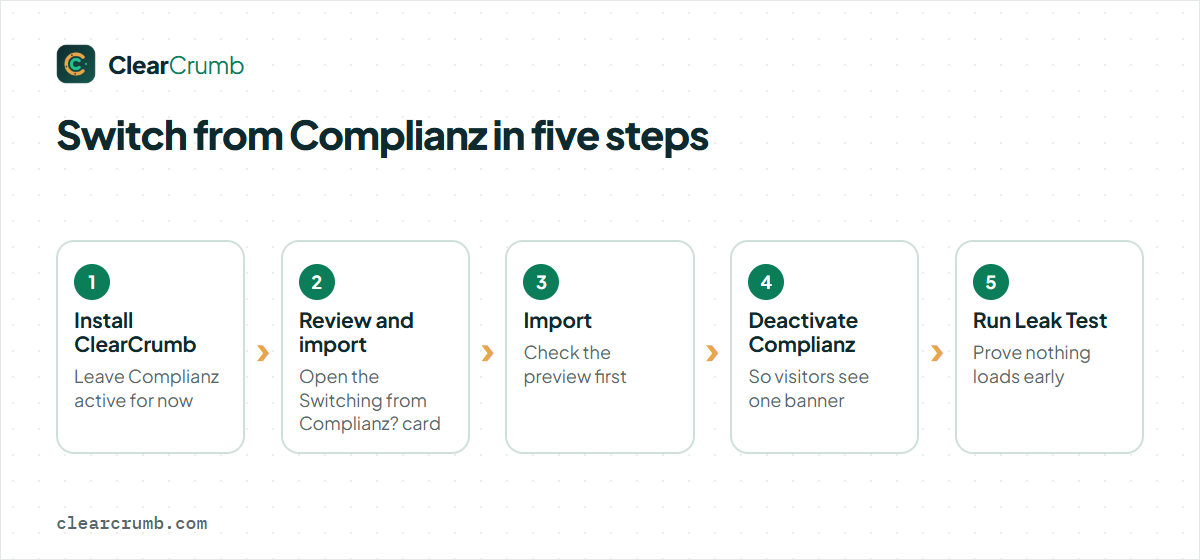
- Install and activate ClearCrumb. Add it from Plugins → Add New and activate it. Do not worry about two banners for the next few minutes; do not leave it that way.
- Open the import card. On the ClearCrumb dashboard a card titled Switching from Complianz? appears when Complianz data exists. Click Review and import.
- Read the preview, then click Import. The dialog Import from Complianz shows a table of every value it will set, such as Banner message and Button colour, and tells you how many services it found and their names. Nothing is applied until you press Import; Cancel closes it without changes.
- Deactivate Complianz. After the import ClearCrumb shows Imported from Complianz. and asks you to deactivate the old plugin on the Plugins screen so visitors do not see two banners. Do it now.
- Run the Leak Test. Click Run Leak Test on the dashboard and read the result, as described in the next section.
That is how you switch from Complianz, start to finish. Everything after this is checking your work, which is worth doing because a banner that shows but does not block is the most common consent mistake.
Check the banner after you switch from Complianz
To switch from Complianz is only half the job. The other half is proof that nothing optional loads before a visitor says yes. Work through these checks in order.
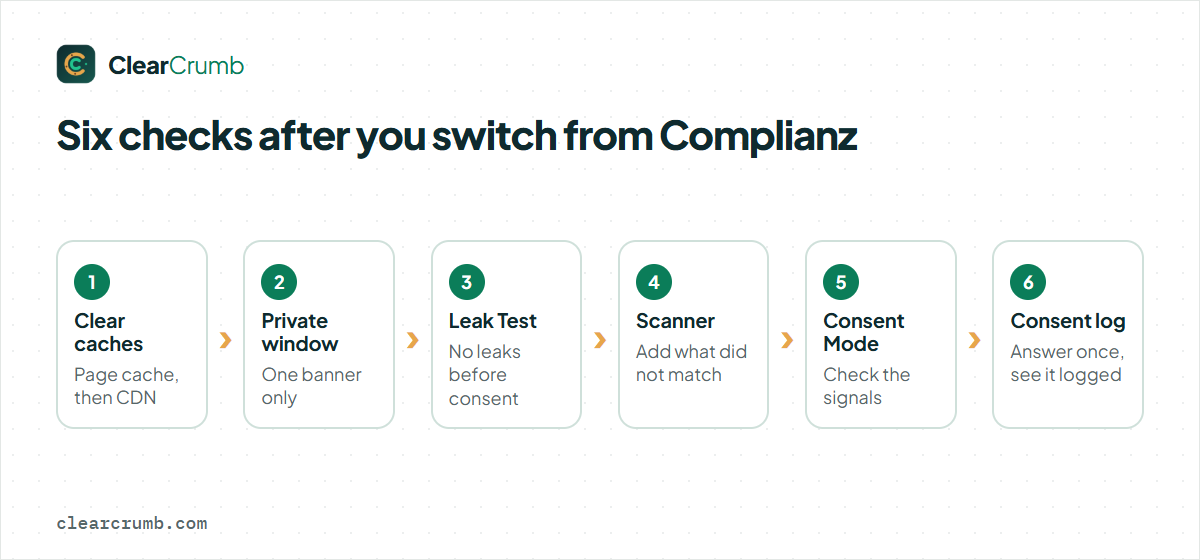
1. Clear every cache. Purge your caching plugin, then your CDN. A cached page from the Complianz era can still contain Complianz’s blocked scripts. ClearCrumb is built to work with full-page caching and tells WP Rocket, LiteSpeed Cache, Autoptimize and SiteGround Optimizer to leave its files alone; the details are on the cache plugins page. If you use a feature that delays all JavaScript until the first interaction, check that the ClearCrumb guard script is excluded.
2. Look at the banner as a new visitor. Open the site in a private window. You should see one banner, with Preferences, Reject all and Accept all for EU, UK and Swiss visitors. If you see two, the old plugin is still active or your theme has its own notice.
3. Run the Leak Test. It loads up to 15 of your pages as a brand-new EU visitor and again after Accept all, and lists every service that loaded before consent. Anything listed as a leak has a Block button. The cookie banner leak test guide explains how to read each line and fix the usual causes.
4. Scan for services that did not match. Go to ClearCrumb → Scanner and click Start scan. Entries under Needs your review are things the import could not sort. A recognised service shows an Add button.
5. Verify Google Consent Mode. If you use Google tags, open ClearCrumb → Services & cookies → Consent signals and confirm the mode. The setup is explained in the Consent Mode documentation. Google’s own consent guide describes the signals your tags should react to, and Tag Assistant shows them in action.
6. Confirm that the new log is filling. Answer the banner once yourself, then open ClearCrumb → Consent log. Your choice should appear with a consent ID, the date and time, and the banner version. The free plugin keeps records for as long as you choose (one year by default) and exports them as CSV, which is enough to confirm that the whole chain works and to keep your proof; Pro adds a signed-off PDF per record.
If you manage client sites, repeat the same six checks on each one and keep the Leak Test result as a dated record of what you delivered. A migration that has a report attached is much easier to defend than one that was simply “done”.
What changes for your visitors after you switch from Complianz
After you switch from Complianz, visitors who accepted or rejected on the old banner are asked again, because their earlier answer was stored by Complianz and ClearCrumb has no record of it. That is normal and expected after any switch; it is also the reason your analytics may show a short dip in tracked sessions in the first days.
It helps to know what differs in behaviour so nothing surprises you. ClearCrumb decides the visitor’s region in the browser, through a small request that is never cached, so one cached page serves every country and still shows the correct banner. US visitors get an opt-out banner and Global Privacy Control is honoured automatically; EU, UK and Swiss visitors get opt-in. You can change this under ClearCrumb → Banner → Regions, or turn geo rules off to show the opt-in banner to everyone, which is the strictest setup.
Your analytics can also change shape after you switch from Complianz, if the old setup loaded Google tags regardless and the new one waits for consent. That is a feature of doing consent properly, not a fault of the plugin. If you want Google to model the visitors who say no, Consent Mode advanced is the setting for that.
Common mistakes when you switch from Complianz
| Mistake | What happens | Fix |
|---|---|---|
| Leaving both plugins active | Two banners, conflicting choices, double blocking. | Deactivate Complianz right after the import. |
| Skipping the cache purge | Visitors still get HTML with the old plugin’s markup. | Purge the page cache and the CDN, then test in a private window. |
| Deleting Complianz before exporting records | You may lose the proof of earlier consents. | Export first, then delete the old plugin only when you are sure. |
| Trusting the import without a test | A service Complianz never listed keeps loading before consent. | Run the scanner and the Leak Test, and fix every leak. |
| Forgetting generated policy pages | A page shows raw shortcode text. | Open each legal page and replace anything that no longer renders. |
Switching from CookieYes or Cookiebot instead
The same card appears for other plugins. ClearCrumb also imports from CookieYes, including its banner type and position, title, message, policy link, button colour, how long a choice is kept and its Consent Mode switches. Cookiebot is different: it keeps your banner texts and cookie list in its own cloud account, so only the Consent Mode switches can be imported, and you run the ClearCrumb scanner to find your services. The steps and the checks after them are the same.
Frequently asked questions
Can I switch from Complianz without losing my settings?
Yes, for everything that can be mapped: banner layout, title, message, button colour, policy link, region behaviour, Consent Mode options and matching services. Consent records are not moved; they stay with Complianz.
Do I have to keep Complianz installed after the import?
No. ClearCrumb keeps what it imported, so you can deactivate Complianz at once. Delete it later, once you have exported any consent records you need and checked your legal pages.
Will visitors see the banner again after I switch from Complianz?
Yes. Their earlier answer is held by Complianz, not by ClearCrumb, so every visitor answers once on the new banner. That also starts a clean consent log.
What if the import finds no services?
The dialog says so. Run the scanner after importing; it opens your pages and lists every service and cookie it sees, and recognised services have an Add button.
Does it affect Google Analytics or Google Ads when I switch from Complianz?
Only in how they are gated. If Consent Mode was on, the switches for URL passthrough and Ads data redaction are imported, and ClearCrumb sends the four consent signals on every choice. Check the Consent signals card after the switch.
Is it worth it to switch from Complianz if my site works fine?
Only if you gain something: records of consent in the free plugin, the Leak Test, a lighter banner or a lower price. Working consent is not a reason to change plugins.
Summary
To switch from Complianz, keep it active while you install ClearCrumb, import its settings from the dashboard card, deactivate it, clear your caches and run the Leak Test. Your banner, colours, services and Consent Mode options move across; your consent records stay behind, so export them first if you need proof. Compare the two plugins honestly on the comparison page, and read the import documentation for the exact mapping. For Complianz’s own feature list, see its plugin page on WordPress.org.